Sprouts in your editor
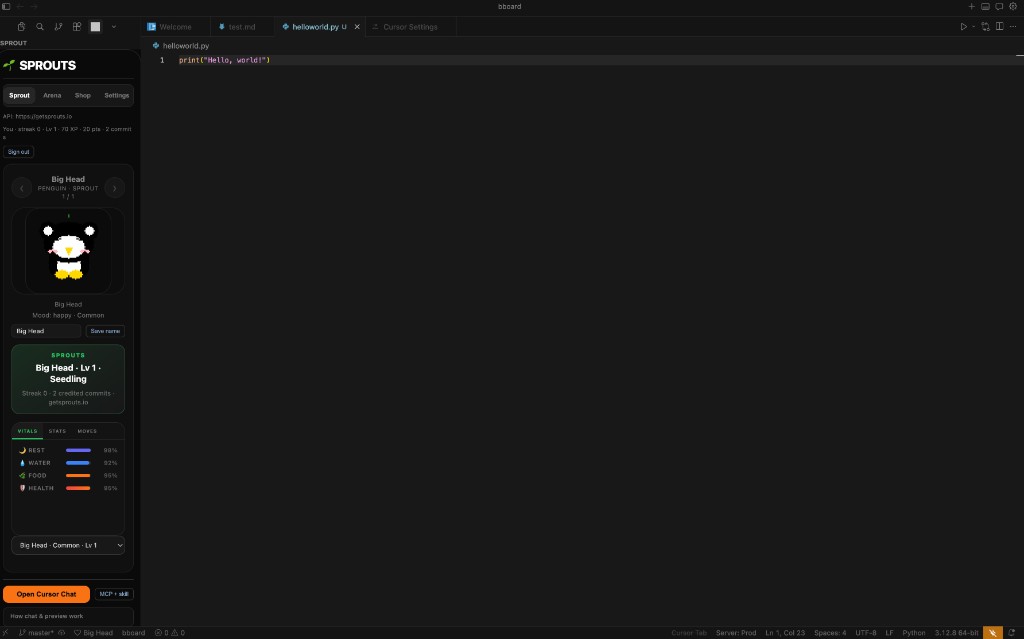
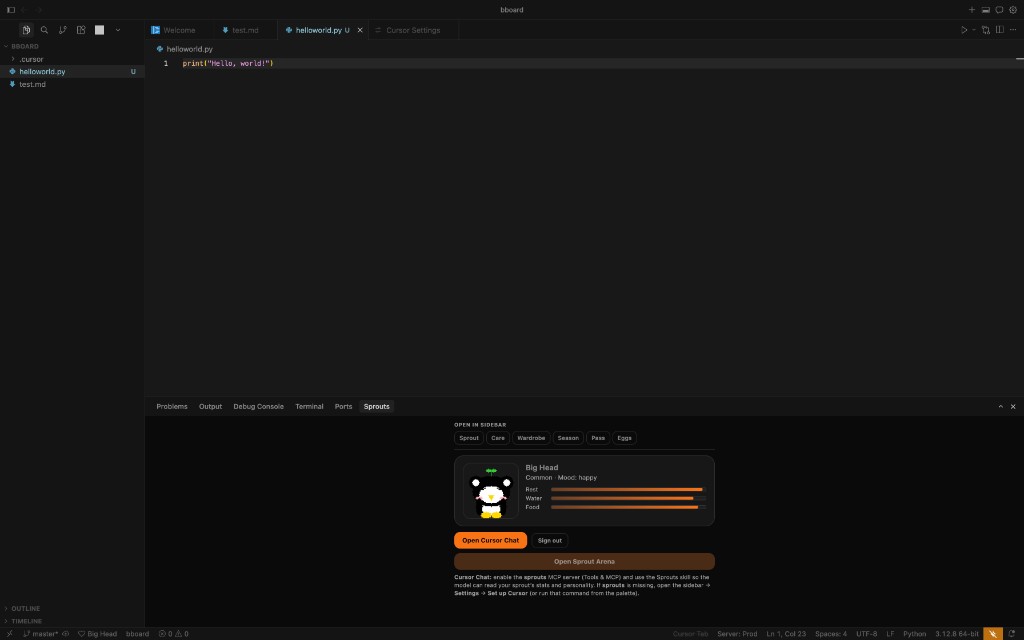
Keep your Sprout beside you while you code: stats, Feed, Store, Eggs, and a pixel spirit preview in the sidebar and mini panel (same six species as on the site—posed art on the homepage is the long-term visual direction). Dialogue happens in Cursor Chat / Composer (or your editor's AI chat where MCP is supported) via the bundled sprouts MCP server and skill—not a separate sidebar LLM. After install, open a folder as your workspace so the extension can write .cursor/mcp.json there.
Compatible editors: Cursor, Visual Studio Code, Google Antigravity, and other VS Code–based apps that load standard VS Code extensions (often via Open VSX or a .vsix). Antigravity is a VS Code fork; install Sprouts the same way as VS Code if the extension does not appear in search (e.g. Install from VSIX… from the Open VS X download).
What it looks like
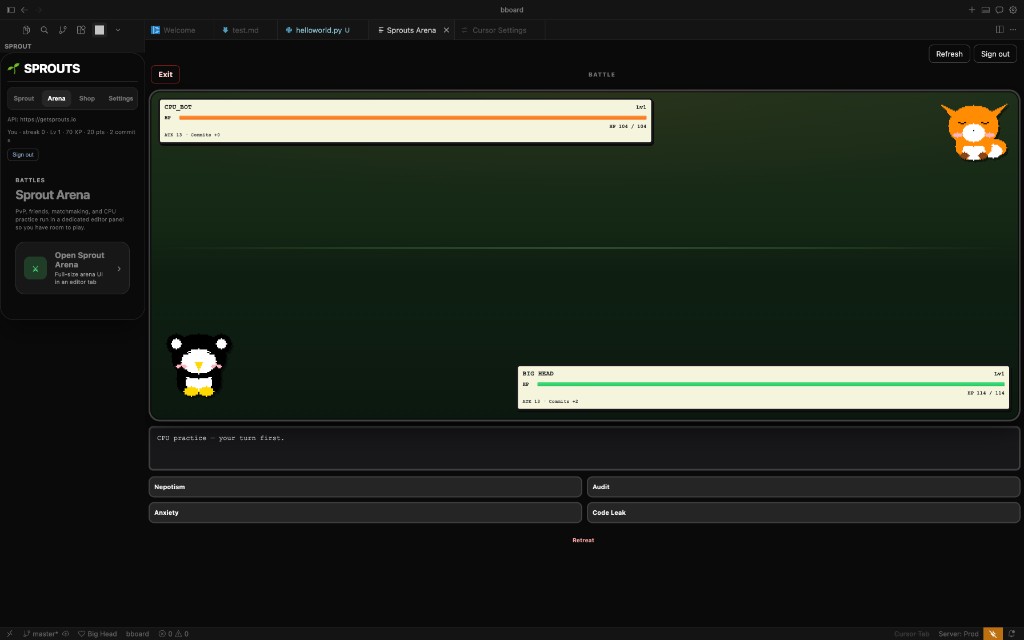
Real installs of Sprouts Companion in Cursor: sidebar, bottom mini panel, and Sprout Arena in an editor tab.
- Install the extension
From Open VSX (Sprouts Companion) or your editor's Extensions marketplace. In Cursor, use the same Open VSX entry or install a
.vsixif your team ships one. - Point the extension at your API
Default is
http://127.0.0.1:3000(Express backend). In settings, set Sprouts: API URL to your deployed API if you are not running locally. If you set this in Cursor, it overrides~/.sprouts/config.jsonfrom the CLI until you clear it.For optional CLI use, set
SPROUTS_API_URLor~/.sprouts/config.jsonwith{ "apiUrl": "https://…" }(no trailing slash). - Sign in (recommended)
Command Palette → Sprouts: Sign in — opens the browser on
/ide/connect. Sign in with GitHub via Supabase Auth (Google and Apple can be added in Supabase later; the connect page only offers GitHub today). Your Sprouts account is synced and this editor is paired.Optional: CLI (headless token file)
npx sprouts-cli login
Saves a token to
~/.sprouts/ide-token.json. The extension imports it if secret storage is empty, and can writeapiUrlto~/.sprouts/config.json. - MCP + skill (Cursor)
With a folder open, the extension normally writes
.cursor/mcp.jsonand.cursor/skills/sprouts/SKILL.mdautomatically (you can turn that off in settings). If sprouts does not appear under Settings → Tools & MCP, run Sprouts: Set up Cursor (MCP + skill in this workspace) or click MCP + skill in the Companion, then Reload Window and enable the sprouts toggle. Chat usingsprouts_list/sprouts_get. - sprouts-cli (developers)
Optional pairing from the terminal. Source: npm: sprouts-cli (
npx sprouts-cli login), monorepopackages/sprouts-cli.
API hosting & Vercel
IDE sign-in uses Supabase OAuth on /ide/connect. Configure NEXT_PUBLIC_SUPABASE_URL, NEXT_PUBLIC_SUPABASE_ANON_KEY on the site, and SUPABASE_JWT_SECRET on the API so POST /api/ide/device/pair-supabase can verify sessions. Enable the GitHub provider in Supabase and add your connect URL to the Auth redirect allow-list (add Google/Apple there too if you later expose those buttons on the connect page).
Optional on-chain features (e.g. NFTs) can stay on Aptos for other clients; the API pattern works on Vercel serverless or a long-running host as long as env vars and DB pooling are set correctly.
See the monorepo docs/DEPLOYMENT.md for Aptos + Vercel notes and Open VS X publishing pointers.
Repo docs & 3D assets
- PUBLIC_RESOURCES.md — Open VS X, npm CLI, what to keep private.
- CHARACTER_3D_AND_TEXTURES.md — aligning GLB models with 2D character art (Blender / UV / textures).
Troubleshooting
- Wrong port / HTML instead of JSON: The API must be the Express app (usually port
3000). Next.js on3001does not serve/api/ide/…. - Local backend:
cd backend && npm run dev, thencurl -s http://127.0.0.1:3000/health. - Pairing expired: Start sign-in again; codes time out after several minutes.
npx sprouts-cli login→device/start500 / “Failed to start device session”: The API database must include theide_device_sessionstable. On the deployed API, run Prisma migrations (migration20260402120000_add_ide_device_session). If the server returns 503 with a message about the missing table, that is the same fix.- “Invalid or expired IDE token” after reload: Sign in again (palette → Sprouts: Sign in) or re-run
npx sprouts-cli login. Tokens do not survive forever; CLI login must complete the browser step so the API can issue a fresh JWT. - MCP spawn ENOENT: Set Sprouts: Node path to your Node binary (e.g.
/opt/homebrew/bin/node).